A fake Google Meet button, and your PC no longer belongs to you
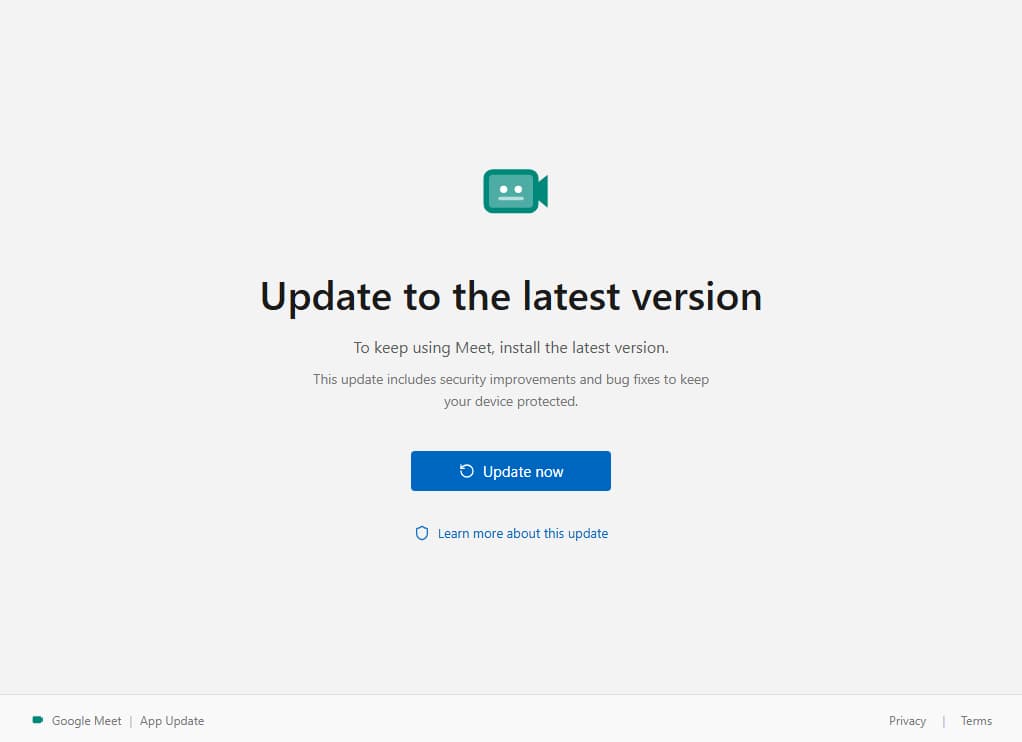
Google Meet tells you an update is required to keep using the service. The page is clean, in Google's colors, with a clearly visible "Update now" button. You click. No file downloads.
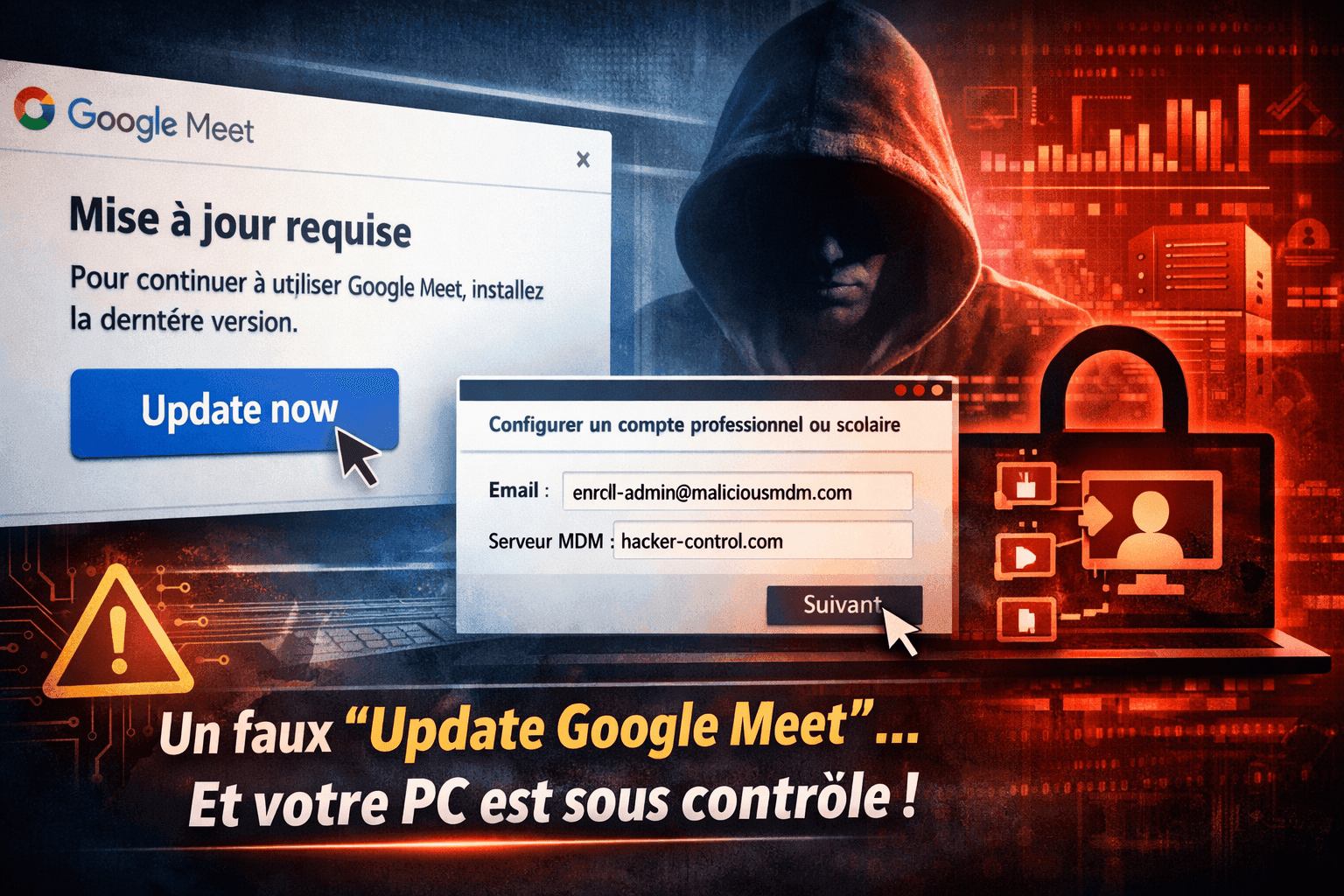
You are in the middle of a workday. A tab opens in your browser: Google Meet tells you an update is required to keep using the service. The page is clean, in Google's colors, with a clearly visible "Update now" button. You click. No file downloads. No alert from your antivirus. Everything looks normal. Except that your computer just changed owner.
The attack that doesn't look like an attack
This scenario is not theoretical. It matches an attack campaign documented on 6 March 2026 by researchers at Malwarebytes, and it is remarkable for what it does not use. No malware. No suspicious download. No booby-trapped attachment. The entire attack relies on perfectly legitimate Windows features and on a commercial device management platform.
The message displayed on the fake page fits on a single line: "To keep using Meet, install the latest version." Nothing more. No account to type in, no password to hand over. Just a button.
How can a single click enroll your PC in an MDM?
Here is how it works. The victim lands on a page that mimics Google Meet: the domain used in this campaign was updatemeetmicro[.]online. When you click the update button, no executable is launched. Instead, the click triggers a protocol built into Windows called ms-device-enrollment. This protocol is normally used in corporate environments to enroll a computer in a device management system, what is called an MDM (Mobile Device Management). It is the same mechanism your IT department uses when it configures your company PC remotely.
The most unsettling part is that none of this is hidden. Microsoft publicly documents this deep link, in the form ms-device-enrollment:?mode=mdm, and documents as well the optional parameter that prefills the user's address so they have one less thing to type. The attackers did not find a backdoor. They read the enrollment documentation written for administrators, and used it at the exact spot where it was meant to be used.
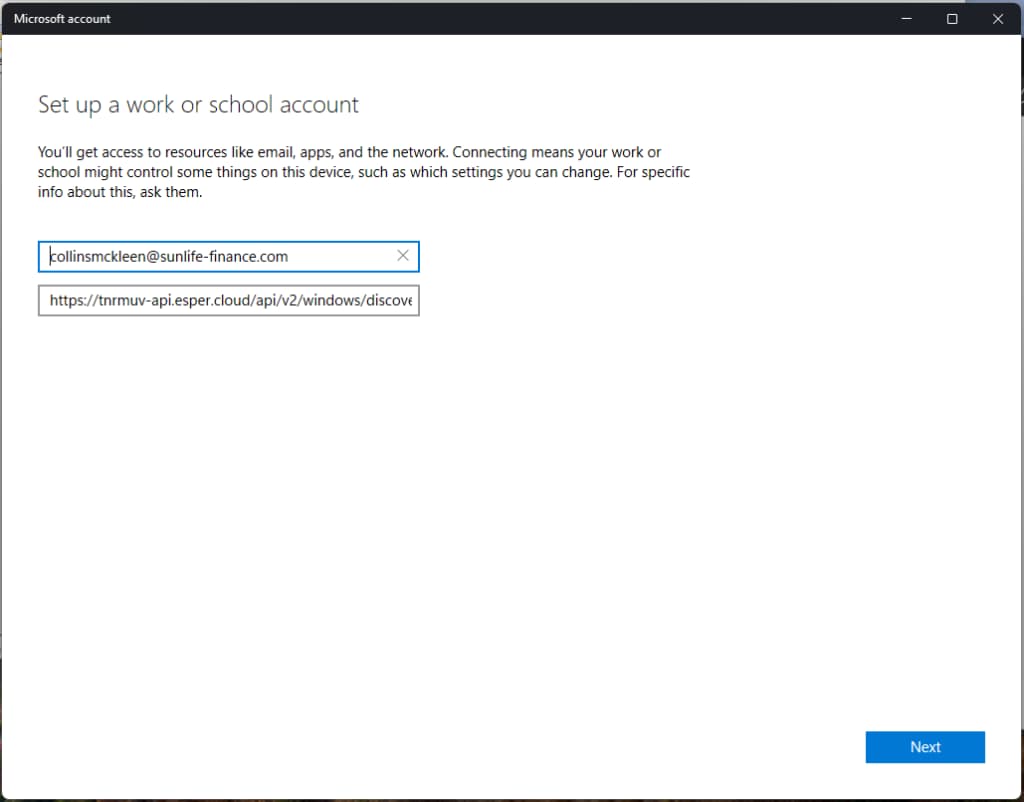
Windows then opens a system window, not a web page, a real Windows window, offering to set up a work or school account. The form is prefilled with an identifier controlled by the attackers, pointing to an MDM server hosted on Esper, a commercial platform used by real companies. In the campaign that was analyzed, that server answered at tnrmuv-api.esper[.]cloud, and the prefilled identifier impersonated the domain name of a financial company, sunlife-finance[.]com. If the user confirms, thinking they are following a legitimate procedure, it is over. Their computer is enrolled in the attackers' management infrastructure.
Why does your antivirus see nothing?
And this is where the attack becomes fascinating from a technical standpoint. The ms-device-enrollment protocol works exactly as Microsoft designed it, and the Esper platform works exactly as Esper designed it. The attackers exploited no software flaw. They simply redirected legitimate mechanisms toward someone who never gave their consent. To an antivirus, there is strictly nothing abnormal to detect. The enrollment window is a real Windows window, not a rigged web page. It therefore slips past browser filters, email scanners and most classic detection tools.
Once the device is enrolled in the attackers' MDM system, they have exactly the same level of control as a legitimate IT administrator. They can install or remove software remotely, access the machine's files, change system settings, lock the screen, deploy surveillance tools, or even wipe the computer entirely. All of it without the user receiving the slightest alert.
Esper reacted. In an update published on 14 May 2026, Malwarebytes reports that the platform identified and removed the fraudulent accounts abusing its Windows provisioning infrastructure, disabled the method in question by default, and added new safeguards. The vendor specifies that neither its customers' environments nor its own internal systems were compromised. That is accurate, and it is precisely the problem: there was nothing to compromise. The provider fixed an enrollment policy, not a vulnerability.
Living off the land: the attackers' new philosophy
This type of attack illustrates a deep shift in cybersecurity that specialists call "living off the land." Rather than developing sophisticated malware that risks being caught by security solutions, attackers prefer to use the tools already present on the victim's machine. The operating system becomes the weapon. The corporate platform becomes the vector. And the user's trust in the interfaces they recognize becomes the main vulnerability.
This is no longer an emerging trend, it is the dominant regime. Bitdefender analyzed 700,000 security incidents reported by its GravityZone platform: 84% of high-severity attacks rely on living off the land techniques. A tasty detail for anyone hunting bad reflexes, the most frequently diverted utility is not PowerShell but netsh.exe, the Windows network configuration tool, present in one third of major attacks.
And the gap between what we know and what we protect remains wide open. In its assessment published on 30 June 2026, carried out among 1,200 IT and security professionals across six countries including France, the same vendor notes that only one respondent in five ranks living off the land among their top three concerns. Four out of five are looking elsewhere.
ANSSI says the same thing in a different vocabulary. Its Panorama de la cybermenace 2025, published on 11 March 2026, counts 3,586 security events handled over the year, including 2,209 reports and 1,366 incidents, and notes a resurgence in the diversion of legitimate tools and services for malicious purposes, first among them remote administration tools such as AnyDesk, TeamViewer, Atera or ScreenConnect.
It is a complete reversal of the classic attack model. For years, cybersecurity was built around a simple logic: identify and block malicious elements. But when the attack contains no malicious element in the technical sense of the term, when each component taken on its own is legitimate, that logic collapses. It is no longer the code that is malicious. It is the intent. And intent is something no antivirus knows how to detect.

Google Meet, Teams, Zoom: why has video conferencing become the hunting ground?
This campaign is not an isolated case either. It belongs to an entire family, and that family has a logic: video conferencing is the only professional software for which an urgent update looks credible, because a meeting is waiting on the other side. The urgency does not need to be manufactured, it is already in the calendar.
As early as February 2026, the Microsoft Defender Experts teams observed several phishing campaigns using meeting invitations as bait. The downloaded files carried reassuring names, msteams.exe, zoomworkspace.clientsetup.exe, adobereader.exe, and were digitally signed with an extended validation certificate issued to the company TrustConnect Software PTY LTD. Behind the installer, no in-house malware but off-the-shelf remote administration tools, ScreenConnect, Tactical RMM, MeshAgent. Netskope Threat Labs documented equivalent campaigns, this time with Datto RMM and LogMeIn, impersonating Zoom, Teams and Google Meet.
The pattern survives its own disclosure. In July 2026, an operation named BlueDash reused the mechanics with an extra layer of polish: an email explaining that a document was too large to be sent directly and had therefore been shared through Microsoft Teams, then a redirect to a fake Microsoft Store page, with Teams styling, screenshots, and even a counterfeit Windows taskbar. The file supportdev.exe installed Level RMM and ScreenConnect side by side, to keep two redundant remote access channels. Public traces go back to February 2026.
The pattern repeats: visual trust, simulated urgency, legitimate tool turned against you. What changes from one campaign to the next is never the trick, only the level of finish.
What to do if you clicked
The check takes a minute and is worth running at the slightest doubt. Open Windows Settings, go to Accounts, then to Access work or school. If a connection appears that you do not recognize, disconnect it, then run a full antimalware scan of the machine. This is the procedure recommended by the researchers who documented the campaign.
On the administrator side, the subject is no longer optional. Microsoft Intune makes it possible to set enrollment restrictions that require every new Windows enrollment to have been authorized beforehand as a corporate enrollment, through Autopilot, a declared hardware identifier or a provisioning package. That is the control that actually closes the door.
One word of caution, however, about the setting that appeared in preview in Intune in March 2026, called "Disable MDM enrollment when adding work or school account on Windows." It removes the enrollment prompt that pops up when a user adds their work account from Edge or an Office application. Its documentation specifies that it does not block enrollments launched from Windows Settings or the Company Portal. In other words, it addresses accidental enrollment, not provoked enrollment. Ticking the box and considering the matter closed would be exactly the kind of mistake these campaigns feed on.
What it changes for us
This kind of attack forces us to rethink what "being protected" means. Having an up-to-date antivirus is no longer enough when the attack uses no malware. Having a secure browser is no longer enough when the trap runs inside a Windows system window. The last line of defense is human vigilance, and that is precisely what these attacks target.
A few concrete reflexes are worth internalizing. A legitimate Google Meet update never shows up in a random web page: it goes through Google Workspace, the Play Store, the App Store or Google's official site. If a Windows window asks you to set up a "work or school account" without you having requested anything, the right reflex is to click Cancel immediately.
But beyond these reflexes, it is our relationship to digital trust that needs questioning. We have been taught to be wary of dubious attachments and suspicious websites. But we have not been taught to be wary of a Windows window that looks like a perfectly normal corporate procedure. The attackers, for their part, have understood this very well.
When protection tools go blind because the attack uses only legitimate components, when the most trusted interface in your operating system becomes the point of entry, one question forces itself upon us: at what point do we stop trusting what we see on our screens?
Sources
- Campaign, domain updatemeetmicro[.]online, server tnrmuv-api.esper[.]cloud, identifier impersonating sunlife-finance[.]com, text of the fake page, Esper's response of 14 May 2026 and the check in Settings, Accounts, Access work or school: Malwarebytes, 6 March 2026.
- Documented format of the ms-device-enrollment deep link and prefilling of the identifier: Microsoft Learn, MDM enrollment of Windows devices.
- 84% of high-severity attacks relying on living off the land and netsh.exe in one third of major attacks, across 700,000 incidents analyzed: Bitdefender.
- One respondent in five ranking living off the land among their top three priorities, survey of 1,200 professionals across six countries: Bitdefender, 2026 Cybersecurity Assessment, 30 June 2026.
- 3,586 security events, 2,209 reports and 1,366 incidents in 2025: ANSSI, Panorama de la cybermenace 2025, 11 March 2026, and CERT-FR, CERTFR-2026-CTI-002.
- Fake Teams, Zoom and Adobe Reader installers signed with an EV certificate issued to TrustConnect Software PTY LTD, deploying ScreenConnect, Tactical RMM and MeshAgent: Microsoft Security Blog, 3 March 2026.
- Campaigns using video conferencing invitations to deploy Datto RMM, LogMeIn and ScreenConnect: Netskope Threat Labs.
- Operation BlueDash, fake Microsoft Store page, supportdev.exe, Level RMM and ScreenConnect side by side: The Hacker News, 27 July 2026.
- Enrollment restrictions and prior authorization of corporate enrollments: Microsoft Learn, Overview of enrollment restrictions.
- The "Disable MDM enrollment when adding work or school account on Windows" setting and its documented limits: Microsoft Learn, Enable MDM automatic enrollment for Windows.
Frequently asked questions
Why doesn't my antivirus detect this attack?
Because it carries no malicious element: it reuses a Windows protocol documented by Microsoft (ms-device-enrollment) and a commercial MDM platform (Esper). Each component taken on its own is normal, so there is nothing abnormal to flag.
What actually happens if I confirm the Windows window?
Your computer is enrolled in the attackers' device management system. They then have the same level of control as an IT administrator: installing or removing software, accessing files, surveilling, locking the screen or wiping the machine, without any alert.
How do I know whether my PC has already been enrolled in an unknown MDM?
Open Settings, then Accounts, then Access work or school. Any connection you do not recognize should be disconnected, then followed by a full antimalware scan of the machine. This is the check recommended by the Malwarebytes researchers.
How do I recognize a genuine Google Meet update?
A legitimate update never shows up in a random web page. It goes through Google Workspace, the Play Store, the App Store or Google's official site. And it never asks you to set up a work or school account.
What is the right reflex when faced with an unsolicited Windows "work or school account" window?
Click Cancel immediately. If you manage a fleet, add enrollment restrictions in Microsoft Intune that require every new Windows enrollment to have been authorized beforehand as a corporate enrollment.
What is "living off the land"?
An approach where attackers write no malware but divert the tools already present on the machine and the legitimate corporate platforms. Bitdefender, after analyzing 700,000 incidents, finds these techniques in 84% of high-severity attacks.
Are Teams and Zoom affected by the same kind of attack?
Yes. In March 2026, Microsoft documented campaigns distributing fake Teams, Zoom and Google Meet installers signed with an EV certificate issued to TrustConnect Software PTY LTD, which deployed ScreenConnect, Tactical RMM and MeshAgent. In July 2026, an operation named BlueDash reused the same pattern with a fake Microsoft Store page.
Sources & methodology
- Malwarebytes, research documenting the campaign (6 March 2026, updated 14 May 2026)
- Microsoft Security Blog (3 March 2026)
- Netskope Threat Labs
- Bitdefender, 2026 Cybersecurity Assessment
- ANSSI, Panorama de la cybermenace 2025 (CERTFR-2026-CTI-002)
- Microsoft Learn, MDM enrollment / Intune documentation

The author
Christophe MazzolaI write about cybersecurity as it's actually lived: governance, the human factor, and everything audit reports don't dare tell the board. Author of « Être en cybersécurité ».

Être en cybersécurité
A cyber roadmap in plain language, for everyone, not just the experts.